
The “Persons” table:
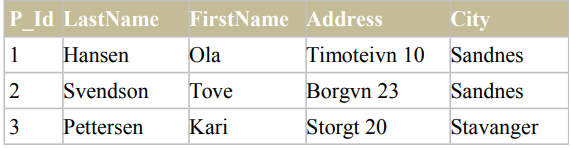
Now we want to select only the persons living in the city “Sandnes” from the table above. We use the following SELECT statement using Where clause:
SELECT * FROM Persons
WHERE City='Sandnes'
The result-set will look like this:

Quotes Around Text Fields in SQL WHERE CLAUSE
SQL uses single quotes around text values (most database systems will also accept double quotes). Although, numeric values should not be enclosed in quotes.
For text values:
This is correct:
SELECT * FROM Persons WHERE FirstName='Tove'
This is wrong
SELECT * FROM Persons WHERE FirstName=Tove
For numeric values:
This is correct:
SELECT * FROM Persons WHERE Year=1965
This is wrong:
SELECT * FROM Persons WHERE Year='1965'
Operators Allowed in the SQL WHERE CLAUSE:
With the WHERE clause, the following operators can be used:
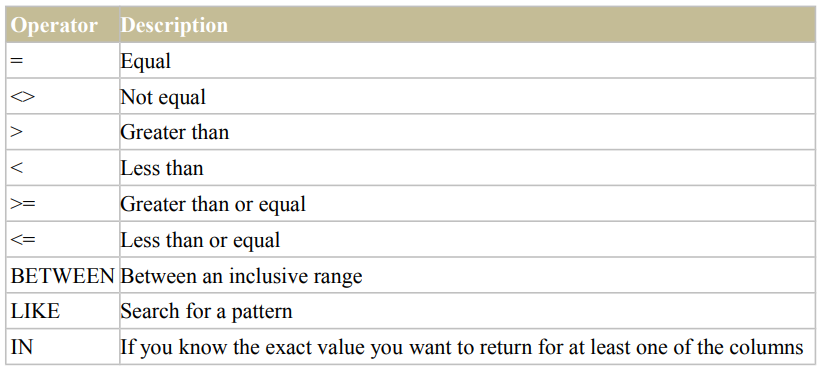
Note: In some versions of SQL the <> operator may be written as !=
The AND & OR Operators:
- The AND & OR operators are used to filter records based on more than one condition.
- The AND operator displays a record if both the first condition and the second condition is true.
- The OR operator displays a record if either the first condition or the second condition is true.
AND Operator Example
The “Persons” table:
Now we want to select only the persons with the first name equal to “Tove” AND the last name equal to “Svendson”: We use the following SELECT statement:
SELECT * FROM Persons
WHERE FirstName='Tove'AND LastName='Svendson'
The result-set will look like this:
P_Id LastName FirstName Address City
2 Svendson Tove Borgvn 23 Sandnes
OR Operator Example
Now we want to select only the persons with the first name equal to “Tove” OR the first name equal to “Ola”: We use the following SELECT statement:
SELECT * FROM Persons
WHERE FirstName='Tove' OR FirstName='Ola'
The result-set will look like this:
P_Id LastName FirstName Address City
1 Hansen Ola Timoteivn 10 Sandnes
2 Svendson Tove Borgvn 23 Sandnes
Combining AND & OR
You can also combine AND and OR (use parenthesis to form complex expressions). Now we want to select only the persons with the last name equal to “Svendson” AND the first name equal to “Tove” OR to “Ola”:
We use the following SELECT statement:
SELECT * FROM Persons
WHERE LastName='Svendson' AND (FirstName='Tove' OR FirstName='Ola')
The result-set will look like this:
P_Id LastName FirstName Address City
2 Svendson Tove Borgvn 23 Sandnes
Important Notice For College Students
If you’re a college student and have skills in programming languages, Want to earn through blogging? Mail us at geekycomail@gmail.com
For more Programming related blogs Visit Us Geekycodes. Follow us on Instagram.