
SQL is a standard language for accessing databases. How to use SQL to access and manipulate data in: MySQL, SQL Server, Access, Oracle, Sybase, DB2, and other database systems.
SQL Syntax:
SELECT Company, Country FROM Customers WHERE Country <> 'USA'
SQL Result:

SQL is a “standard language for accessing and manipulating databases”.
- What is SQL?
- SQL stands for Structured Query Language
- SQL lets you access and manipulate databases
- SQL is an ANSI (American National Standards Institute) standard
What Can SQL do?
- SQL can execute queries against a database
- SQL can retrieve data from a database
- SQL can insert records in a database
- SQL can update records in a database
- SQL can delete records from a database
- SQL can create new databases
- SQL can create new tables in a database
- SQL can create stored procedures in a database
- SQL can create views in a database
- SQL can set permissions on tables, procedures, and views.
RDBMS
- RDBMS stands for Relational Database Management System.
- RDBMS is the basis for SQL, and for all modern database systems like MS SQL Server, IBM DB2, Oracle, MySQL, and Microsoft Access.
- The data in RDBMS is stored in database objects called tables.
- A table is a collections of related data entries and it consists of columns and rows.
SQL BASICS
Database Tables
A database most often contains one or more tables. Each table is identified by a name (e.g. “Customers” or “Orders”). Tables contain records (rows) with data. Below is an example of a table called “Persons”:
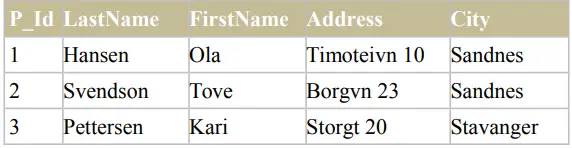
The table above contains three records (one for each person) and five columns (P_Id, LastName, FirstName, Address, and City).
SQL Statements
Most of the actions you need to perform on a database are done with SQL statements. The following SQL statement will select all the records in the “Persons” table:
SELECT * FROM Persons
Note:
- SQL is not case sensitive
- Semicolon after SQL Statements?
- Some database systems require a semicolon at the end of each SQL statement.
- Semicolon is the standard way to separate each SQL statement in database systems that allow more than one SQL statement to be executed in the same call to the server.
- We are using MS Access and SQL Server 2000 and we do not have to put a semicolon after each
- SQL statement, but some database programs force you to use it.
SQL DML and DDL
SQL can be divided into two parts: The Data Manipulation Language (DML) and the Data Definition Language (DDL).
The query and update commands form the DML part of SQL:
SELECT – extracts data from a database
UPDATE – updates data in a database
DELETE – deletes data from a database
INSERT INTO – inserts new data into a database
The DDL part of SQL permits database tables to be created or deleted. It also define indexes (keys), specify links between tables, and impose constraints between tables. The most important DDL statements in SQL are:
- CREATE DATABASE – creates a new database
- ALTER DATABASE – modifies a database
- CREATE TABLE – creates a new table
- ALTER TABLE – modifies a table
- DROP TABLE – deletes a table
- CREATE INDEX – creates an index (search key)
- DROP INDEX – deletes an index
The SQL SELECT Statement
- The SELECT statement is used to select data from a database.
- The result is stored in a result table, called the result-set.
- SQL SELECT Syntax
SELECT column_name(s)
FROM table_name
And
SELECT * FROM table_name
Note: SQL is not case sensitive. SELECT is the same as select.
An SQL SELECT Example
The “Persons” table:
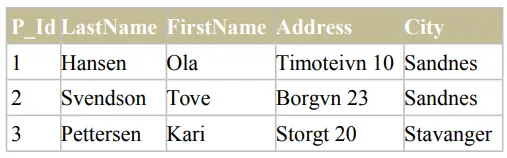
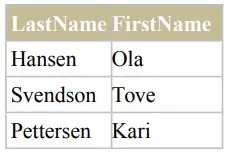
Now we want to select the content of the columns named “LastName” and “FirstName” from the table above. We use the following SELECT statement:
SELECT LastName,FirstName FROM Persons
The result-set will look like this:
SELECT * Example
Now we want to select all the columns from the “Persons” table. We use the following SELECT statement:
SELECT * From Persons
The SQL SELECT DISTINCT Statement
- In a table, some of the columns may contain duplicate values. This is not a problem, however, sometimes you will want to list only the different (distinct) values in a table.
- The DISTINCT keyword can be used to return only distinct (different) values.
- SQL SELECT DISTINCT Syntax
SELECT DISTINCT column_name(s)
FROM table_name
SELECT DISTINCT Example
The “Persons” table:
Now we want to select only the distinct values from the column named “City” from the table above. We use the following SELECT statement:
SELECT DISTINCT City FROM Persons
The result-set will look like this:
City
Sandnes
Stavanger