
- SQL wildcards can be used when searching for data in a database.
- SQL wildcards can substitute for one or more characters when searching for data in a database.
- SQL wildcards must be used with the SQL LIKE operator
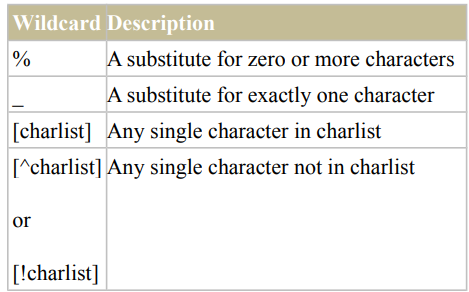
- With SQL, the following wildcards can be used:
SQL Wildcard Examples
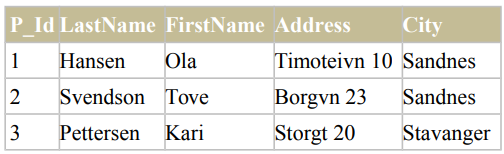
We have the following “Persons” table:
Using the % Wildcard
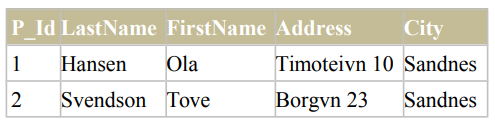
Now we want to select the persons living in a city that starts with “sa” from the “Persons” table. We use the following SELECT statement:
SELECT * FROM Persons
WHERE City LIKE 'sa%'
The result-set will look like this:
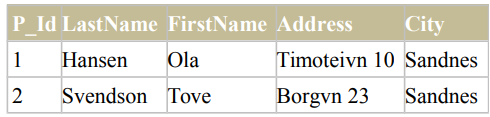
Next, we want to select the persons living in a city that contains the pattern “nes” from the “Persons” table. We use the following SELECT statement:
SELECT * FROM Persons
WHERE City LIKE '%nes%'
The result-set will look like this:
Using the _ Wildcard
Now we want to select the persons with a first name that starts with any character, followed by “la” from the “Persons” table.
We use the following SELECT statement:
SELECT * FROM Persons
WHERE FirstName LIKE '_la'
The result-set will look like this:
P_Id LastName FirstName Address City
1 Hansen Ola Timoteivn 10 Sandnes
Next, we want to select the persons with a last name that starts with “S”, followed by any character, followed by “end”, followed by any character, followed by “on” from the “Persons” table.
We use the following SELECT statement:
SELECT * FROM Persons
WHERE LastName LIKE 'S_end_on;
The result-set will look like this:
P_Id LastName FirstName Address City
2 Svendson Tove Borgvn 23 Sandnes
Using the [charlist] Wildcard
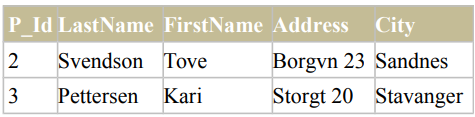
Now we want to select the persons with a last name that starts with “b” or “s” or “p” from the”Persons” table. We use the following SELECT statement:
SELECT * FROM Persons
WHERE LastName LIKE '[bsp]%'
The result-set will look like this:
Next, we want to select the persons with a last name that do not start with “b” or “s” or “p” from the “Persons” table. We use the following SELECT statement:
SELECT * FROM Persons
WHERE LastName LIKE '[!bsp]%'
The result-set will look like this:
